How a 23-second AI video was made: four approaches
I wanted to show AI drawing geometry. I went through an early narration, the Zosia system voice and ElevenLabs. Along the way, I also changed how the drawing was shown and the pace of the edit.
- Goal
- Show an AI agent drawing a building’s geometry in AppEnergo in no more than 30 seconds, with visible action and Polish narration.
- Tools
AI agent · AppEnergo · AVFoundation · Cap · macOS system voice — Zosia · ElevenLabs
- Process
- Four versions: first attempt → selected plan and the Zosia system voice → drawing with Jacek’s voice → original pace restored.
- Result
- A 23.067-second Full HD video at 30 frames/s, with Jacek’s voice at its original pace. The picture was shortened without regenerating the narration.
Four attempts — from the first voice to the finished edit
Original recordings with a synthetic Polish voice. The English text below describes the work and the limits of the demonstration. Each player includes Polish captions and English subtitles, available through the captions menu.
1. First attempt · 28 s
2. Zosia system voice · 28 s
3. Jacek — slowed down · 28 s
4. Jacek — original pace · 23.067 s
Tools and their roles
- AI agent and browser — the agent operated the local editor, drew the geometry and prepared material for successive versions. I selected the plan, assessed the picture and voice, and approved the direction of the revisions.
- AppEnergo — the application used for the demonstration: uploading a plan and drawing the building’s geometry.
- AVFoundation — macOS media tools used locally to assemble frames and audio.
- Cap — preparing the visual treatment, edit and video export with narration.
- macOS system voice — Zosia — a Polish narration attempt in version two, before I moved to ElevenLabs.
- ElevenLabs — voice samples and Polish narration. I ultimately chose Jacek — Deep Warm Studio Broadcast.
Process: first, I narrowed the goal
At first, I planned to show in under half a minute how an AI agent helps draw a building’s geometry in AppEnergo. The idea was broader: from uploading a plan, through setting scale and north, tracing walls, dividing rooms, roof and floor, to import. That would have been a tutorial rather than a short, engaging demonstration.
I narrowed the task. The video was meant to encourage use of AI and run for no more than 30 seconds. Equally important was what a technical brief alone did not capture: the viewer had to see walls being drawn, not a series of finished screens.
Attempt 1: a simple plan and the first narration
The first version, using a simple test plan, lasted 28 seconds. The process was visible, but the Polish narration did not sound convincing. After this attempt, I needed the right plan and a better voice.
Attempt 2: the Zosia system voice and the selected plan
In the second version, we used the indicated, more realistic plan and the Zosia system voice. The video lasted 28 seconds. The narration still did not meet my expectations, and the edit consisted mainly of static shots. Both the voice and the way the work was shown needed to change.
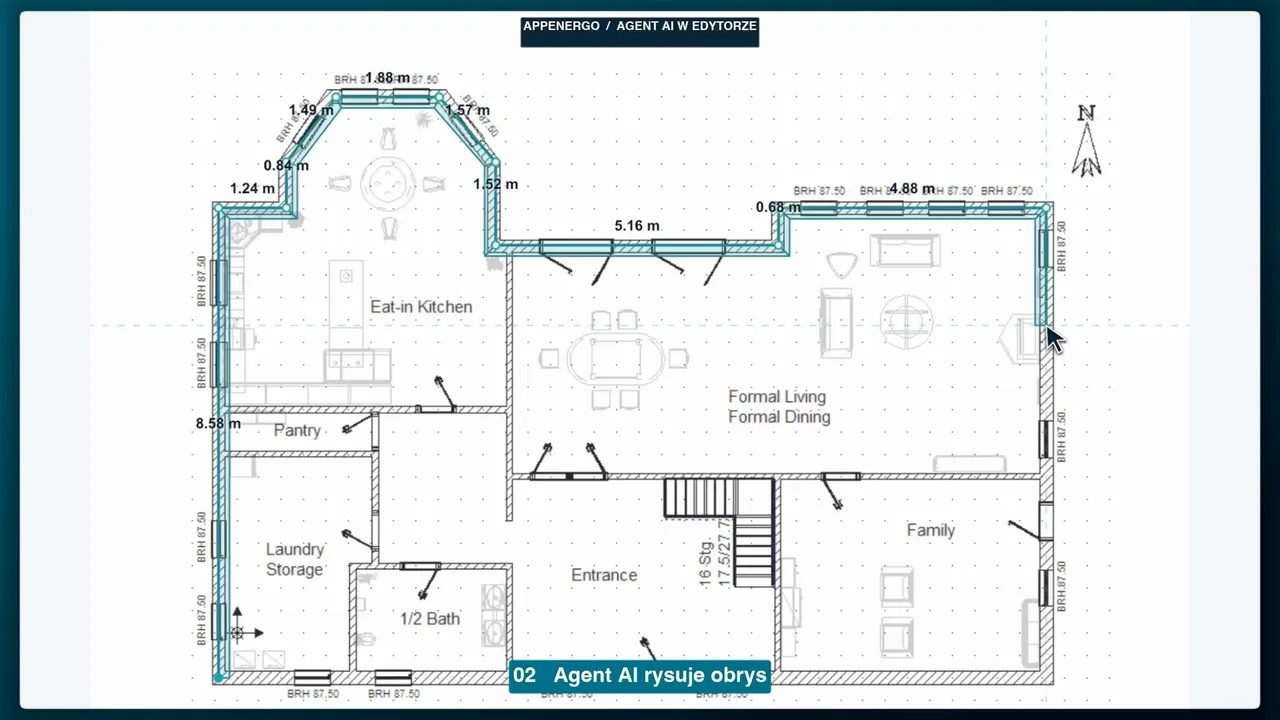
That was an important moment: the right visual context does not yet mean that a video shows the work. Instead of moving from result to result, it had to show action—successive wall segments and the room division taking shape. The agent controlled the local editor and actually drew the geometry. We recorded page frames and the positions of the actions performed, then added an enlarged arrow in the edit. It was not a native system pointer recorded in the footage, but a clear visualization of the agent’s real movements. We used Cap to edit and export the film.
Attempts to capture the whole window also included elements covering it. We therefore assembled the final footage from frames of the browser page itself. This resolved the problem of unwanted elements in the picture.
Attempt 3: I chose the voice, but the edit slowed it down
Polish text does not guarantee good Polish narration. I rejected earlier voices, then compared samples in ElevenLabs. I bought access to the service and, after trying Daniel, selected and confirmed the Jacek — Deep Warm Studio Broadcast voice.
The third version, lasting 28 seconds, already showed the agent drawing. The issue appeared in the sound. Jacek’s original narration lasted about 21.4 seconds, but it was stretched to 26 seconds in the edit to fit the prepared picture. The voice pitch remained similar, but the pace and energy clearly suffered. This was not an argument against the selected narrator; the error arose while fitting audio to video.
Attempt 4: we fitted the picture to the voice
The fix was simpler than generating another narration. We restored the audio’s original pace, shortened the picture, and exported a fourth version lasting 23.067 seconds. Instead of forcing the narrator’s pace, the edit was adjusted to the voice. The narration was not regenerated.
Result: 23 seconds with the original narration pace
The result was a Full HD file at 30 frames per second, made available for download. The four versions above show the path from the first attempt, through the Zosia system voice, to Jacek from ElevenLabs. The last two also let you compare the pace: 28 seconds with stretched narration and 23.067 seconds with the voice at its original pace. Saving the file alone is not a full quality sign-off or publication.
The practical rule from this attempt is simple: before stretching an approved voice track, listen to it in the final edit. If the energy disappears, shorten or rebuild the picture first.
What this video actually shows
This is an accelerated, edited demonstration, and the 23 seconds are the video’s duration, not a measured time for completing the whole task. The video shows an agent using an existing editor; it does not demonstrate automatic recognition of an entire plan or a new AppEnergo feature. The room division is illustrative, and the 15 m reference segment was assumed for the demonstration—it does not confirm the plan’s dimensions or the geometry’s correctness.
The final screen showing a successful import comes from an earlier successful import in the same demonstration. It is not evidence of a new import for every recorded outline version. I came away from this work with a simple rule: an agent can carry out actions, but I need to decide what should be visible, how it should sound, and when the material is clear enough.